
Connect your AI
Connect Waresport to Grok
Updated November 20, 2026 · Club admins
Grok.com uses the same key-in-URL format as ChatGPT. The Grok API uses a Bearer token on the `/rpc` endpoint instead of a query string.
Create an API key
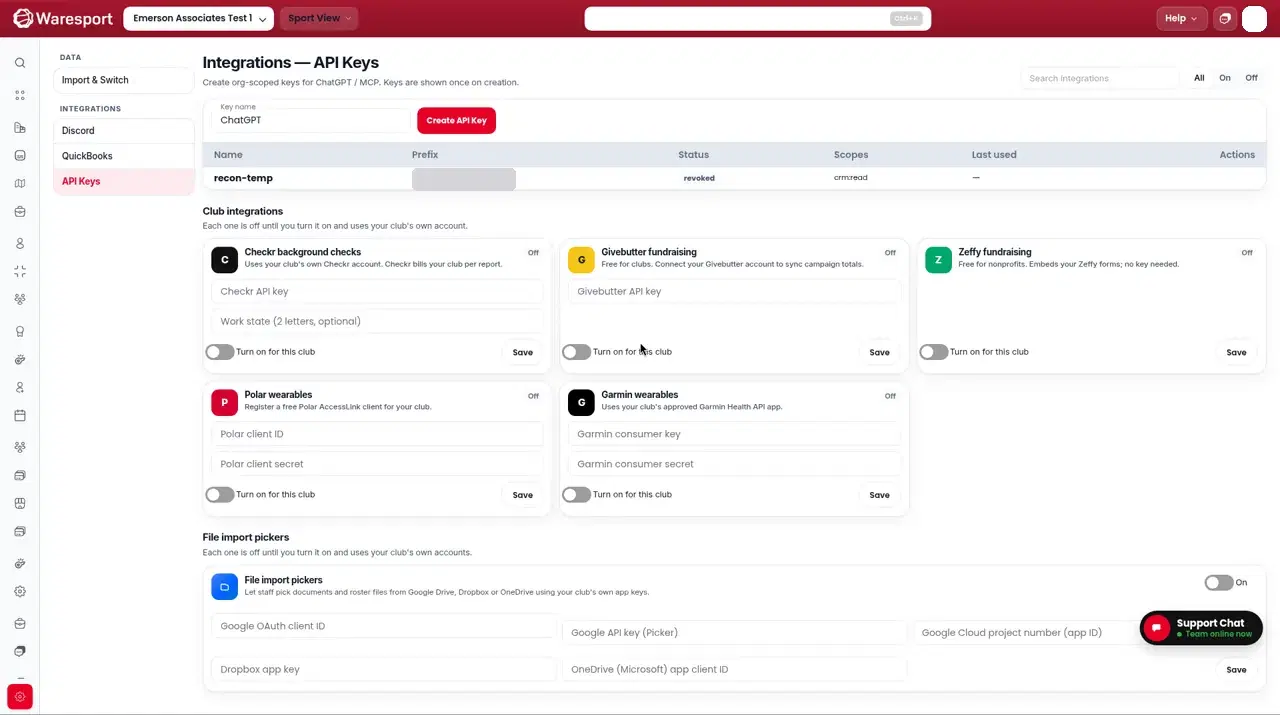
- 1In the admin panel, go to Integration Settings and open the API Keys tab.
- 2Create a key if you do not have one, and copy the
wsp_live_value.
Connect on Grok.com
- 1Open grok.com/connectors → New Connector → Custom (Business/Enterprise: an admin provisions first).
- 2Paste this Server URL, with your key in place of
YOUR_KEY:
https://0jvw8mre8l.execute-api.us-east-2.amazonaws.com/api/v1/mcp/rpc?api_key=YOUR_KEY
- 1If the dialog offers headers or a token field instead of a key-in-URL, you can enter
AuthorizationBearer YOUR_KEY. Prefer the key-in-URL on Grok.com when that option is available. - 2Save the connector, then ask Grok to list teams, look up an athlete, or stage a communication.
A live screenshot from Grok.com will go here. This is not a recreation of the Grok UI.
Prefer the /rpc Streamable HTTP URL above. The server must be reachable on the public internet.
Connect with the Grok API
Send the API key as an HTTP header, not in the query string:
- URL:
https://0jvw8mre8l.execute-api.us-east-2.amazonaws.com/api/v1/mcp/rpc - Header:
Authorization: Bearer wsp_live_...
Do not use the /secure sign-in URL for the Grok API.
FAQs
- Is this the same URL ChatGPT uses?
- Yes for Grok.com: `https://0jvw8mre8l.execute-api.us-east-2.amazonaws.com/api/v1/mcp/rpc?api_key=...`. The Grok API is different — it uses a Bearer header on `/rpc` with no key in the URL.