
Connect your AI
Connect Waresport to Claude
Updated November 20, 2026 · Club admins
Use Claude to read your club data or stage changes through the Waresport MCP connector. Claude.ai uses the secure MCP URL and the Waresport Connect page. You'll paste an existing `wsp_live_` key and click Allow. Nothing about ChatGPT's connection changes.
Create an API key
- 1In the admin panel, go to Integration Settings and open the API Keys tab.
- 2Create a key if you do not have one, and copy it. Keep the key private — it can read and change club data.
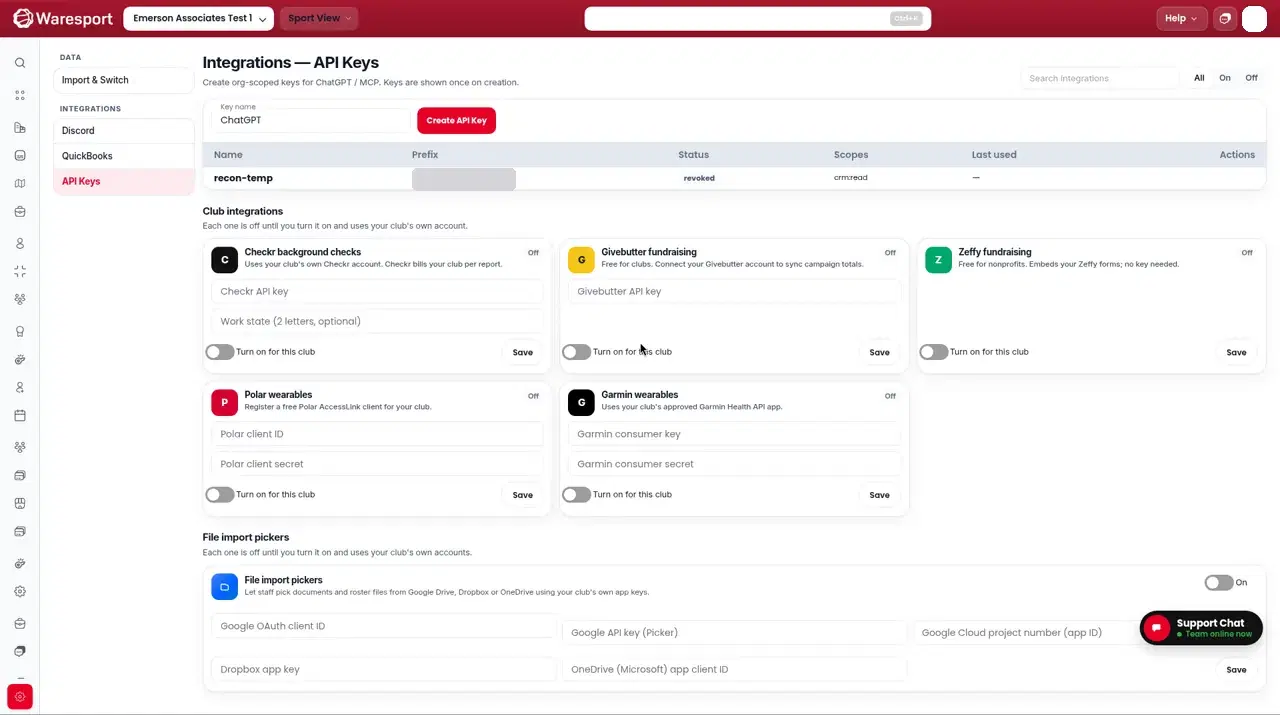
Add the Claude connector
- 1Open Claude → Customize → Connectors → Add custom connector. (Team/Enterprise: Owners add under Organization settings → Connectors.)
- 2Name it “Waresport” and paste this Server URL:
https://0jvw8mre8l.execute-api.us-east-2.amazonaws.com/api/v1/mcp/secure
- 1Complete sign-in on the Waresport Connect page: paste your
wsp_live_key and click Allow. You are then sent back to Claude.
Illustration of the Waresport Connect page — not a vendor screenshot
Connect Claude to Waresport
Claude is asking to use your club's Waresport data through the Waresport MCP connector. After you approve, you'll be sent back to the app.
Use the key from Admin Panel → Settings → Integrations → API keys. It's checked here and never shared with Claude. It gets the same permissions as the key.
- 1Enable the connector in a chat, then ask Claude something you can verify, such as “List athletes in my club with a missing birth date.” If the connection worked, it will use your Athletes records.
A live screenshot from Claude will go here after the connector is live. This is not a recreation of the Claude UI.
Claude reaches your server from Anthropic's cloud, so the URL must be the public HTTPS address above. Do not use localhost. Free plans allow one custom connector.
Desktop or CLI clients (including Claude Code) may open a local address. The Connect page warns you when the return address is on your own computer — only continue if you started the connection yourself.
FAQs
- Why not put the API key in the URL like ChatGPT?
- Claude.ai starts sign-in at connect time. The `/secure` endpoint requires authentication up front and opens the Waresport Connect page, where you paste the key and click **Allow**.
- Does this change ChatGPT?
- No. ChatGPT still uses `/api/v1/mcp/rpc?api_key=...` with No Auth.