
Connect your AI
Connect Waresport to Gemini
Updated November 20, 2026 · Club admins
The Gemini app and Gemini Enterprise can connect to Waresport through MCP with OAuth. Apps that ask for a Client ID and Client secret use the Waresport register page. You then paste your `wsp_live_` key on the Waresport Connect page and click Allow.
Create an API key
- 1In the admin panel, go to Integration Settings and open the API Keys tab.
- 2Create a key if you do not have one, and copy it.
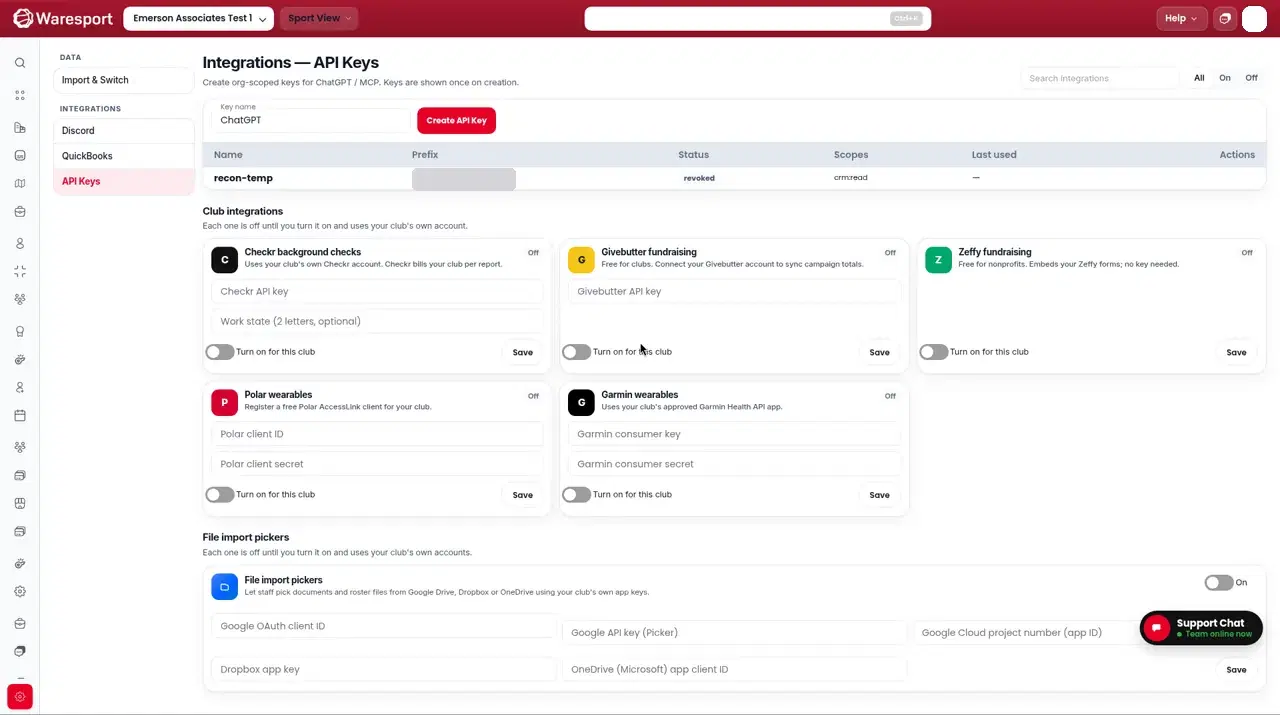
Get a Client ID and Client secret
- 1Open the Waresport OAuth client page:
https://0jvw8mre8l.execute-api.us-east-2.amazonaws.com/api/v1/mcp/oauth/register
- 1Paste the redirect URI the Gemini app shows you.
- 2Click Create client, then copy the Client ID and Client secret.
The register page is for apps that ask for a Client ID and Client secret (Gemini, Gemini Enterprise). The placeholder redirect on that page is https://vertexaisearch.cloud.google.com/oauth-redirect (Gemini Enterprise). The Gemini app uses a redirect under https://oauth-redirect.googleusercontent.com/r/.
Add the Gemini connector
- 1In Gemini Enterprise or Gemini Business, go to Settings → Manage team → Connected apps → Add MCP Server. (Custom MCP is on Gemini Enterprise or Gemini Business.)
- 2Server URL: paste
https://0jvw8mre8l.execute-api.us-east-2.amazonaws.com/api/v1/mcp/secure(Streamable HTTP only — SSE is not supported by Gemini). - 3When the app asks for a Client ID and Client secret, paste the values from the register page.
- 4Complete sign-in on the Waresport Connect page: paste your
wsp_live_key and click Allow.
Illustration of the Waresport Connect page — not a vendor screenshot
Connect Gemini to Waresport
Gemini is asking to use your club's Waresport data through the Waresport MCP connector. After you approve, you'll be sent back to the app.
Use the key from Admin Panel → Settings → Integrations → API keys. It's checked here and never shared with Gemini. It gets the same permissions as the key.
- 1Reload custom actions and enable the Waresport tools.
A live screenshot from Gemini will go here. This is not a recreation of the Gemini UI.
FAQs
- Does consumer gemini.google.com work the same way?
- The older connector notes say consumer gemini.google.com does not expose the same custom MCP UI as Gemini Enterprise or Gemini Business. The Gemini app custom-connector flow is the one that uses a `googleusercontent.com` redirect and the Client ID page.
- What if Gemini asks for OAuth instead of a key in the URL?
- Use the `/secure` URL and the Client ID page. Do not put the API key in the Gemini server URL unless the app is clearly asking for a key-in-URL connection.