
Connect your AI
Connect Waresport to ChatGPT
Updated November 20, 2026 · Club admins
ChatGPT connects to Waresport over the public MCP `/rpc` endpoint with the API key in the URL. ChatGPT behavior is unchanged by the OAuth sign-in flow used by other clients. Use No Auth in ChatGPT — the key is already in the URL.
Create an API key
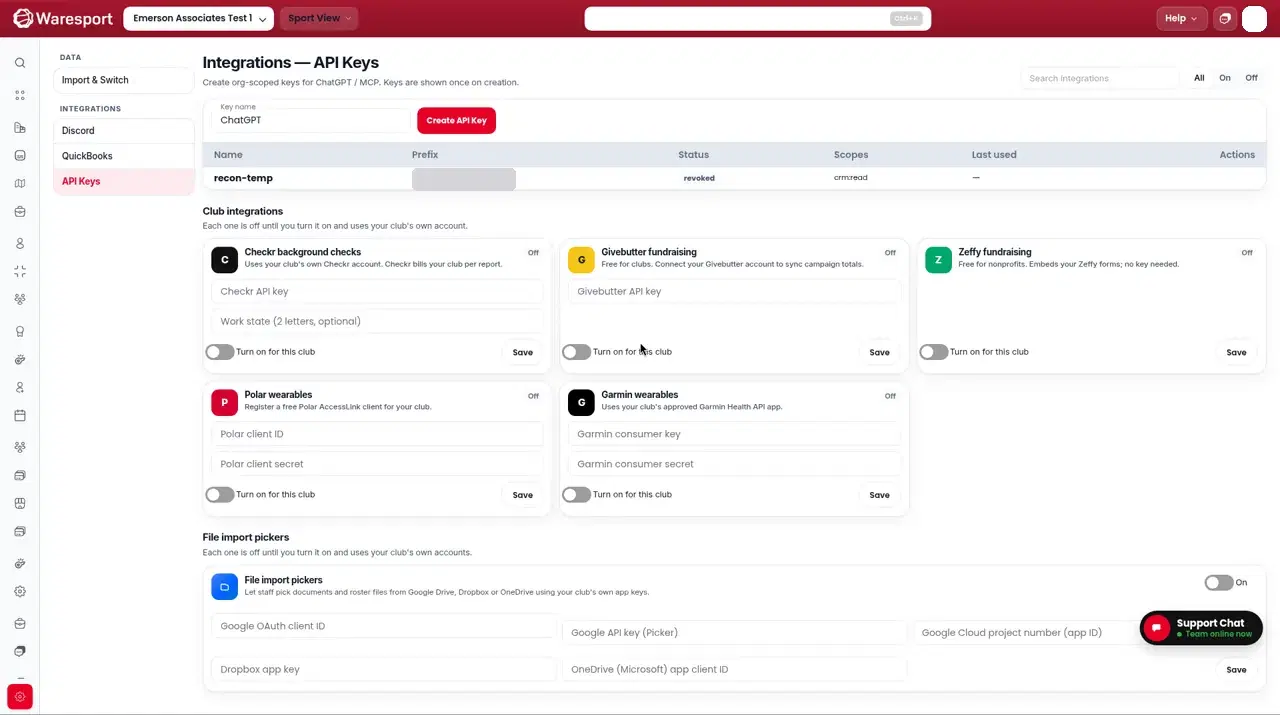
- 1In the admin panel, go to Integration Settings and open the API Keys tab.
- 2Create a key if you do not have one, and copy the
wsp_live_value.
Add the ChatGPT connector
- 1Open ChatGPT → Settings → Connectors (or Custom GPT Actions / MCP).
- 2Add a custom connector and paste this Server URL, with your key in place of
YOUR_KEY:
https://0jvw8mre8l.execute-api.us-east-2.amazonaws.com/api/v1/mcp/rpc?api_key=YOUR_KEY
- 1Choose authentication: No Auth — the key is already in the URL.
- 2Save, then enable the Waresport connector in a chat and ask it to list athletes or stage an event.
A live screenshot from ChatGPT will go here. This is not a recreation of the ChatGPT UI.
ChatGPT Work often cannot send Authorization headers; use the key-in-URL format above. Sensitive writes still require approve/reject in chat or the Approvals page in the admin panel.
FAQs
- Why is the key in the URL instead of a header?
- ChatGPT Work often cannot send an Authorization header. The Waresport `/rpc` endpoint accepts `?api_key=` for that reason.
- Does this use the Waresport Connect sign-in page?
- No. ChatGPT uses the `/rpc` URL with the key in the query string, not the `/secure` sign-in URL.