
Key Takeaways:
- Centralize sports league practice scheduling with one facility calendar to prevent double-bookings and scheduling conflicts.
- Create clear scheduling rules for team priorities, practice rotations, blackout dates, and schedule change requests.
- Automate recurring practice schedules and check availability across courts, fields, and other sports facilities.
- Connect registration, payments, and rosters to keep sports league schedules accurate and up to date.
- Centralize communication for practice changes, cancellations, weather alerts, and coach and parent updates.
- Track scheduling performance using attendance, facility utilization, revenue, and eligibility reports to improve league operations.
It's 9:40 on a Tuesday night. A U12 coach texts that the gym is locked. Another coach says his team has had the same 5:00 slot for three weeks straight, and now someone else's parents are standing on his court, arms crossed. Your phone buzzes again. A parent wants to know if practice is canceled because of the rain. Everything feels overwhelming and chaotic.
If that sounds familiar, you don't have a people problem. You have a sports league practice scheduling problem.
For that matter, good sports league practice scheduling comes down to five things working together: one shared facility calendar, scheduling rules set once and published, automatic conflict blocking, availability tracking so you know who's actually coming, and a single channel for every change. Spreadsheets and group chats can fake two or three of those. They can't do all five reliably once you pass about 10 teams. See how Waresport handles all five.
This guide is for club directors, facility managers, academy owners, high school athletic directors, and league schedulers. It covers why manual scheduling breaks down, what a working system looks like, how to evaluate software without getting sold a story, and how to move mid-season without disrupting the teams already on your calendar.
Why Manual Practice Scheduling Breaks Down
Scheduling looks like a calendar task on paper. In practice, it's four problems stacked on top of each other, and each one feeds the next.
1. Registration Chaos and Payment Delinquency
You can't schedule what you can't count. If registration is a Google Form, a PDF, and a Venmo request, your rosters are always slightly off. A kid gets added to a team Monday, the payment bounces Wednesday, and by Saturday nobody's sure if he's eligible to be on the field.
Late fees go unenforced because chasing them feels awkward, especially when you know the family. Parents dispute charges because the terms were buried in a form nobody actually read. Chargebacks eat your margin and your patience in roughly equal measure. And when the roster is uncertain, you build the practice schedule on guesses. You reserve a full court for a team that has seven paid players and three who never finished checkout.
Delinquency is a scheduling issue too, not just a finance one. Teams with unresolved balances still show up. They still take court time. They still tie up a slot another fully paid team could be using.
2. Facility and Court Double-Bookings
Double-booking court 3 is a classic failure, and it happens for boring reasons. Two people edit the same spreadsheet. A coach swaps a slot verbally and forgets to tell the scheduler. A rental group of books through a separate system that nobody checks against the league calendar. Nobody is careless, exactly. The system just has no way to say "no" before it's too late.
The cost runs past the awkward standoff on the court. You lose trust with coaches. You lose rental revenue when you have to comp a group for the mix-up. You burn an hour on damage control that should have taken zero minutes. Managing 50 teams through spreadsheets is like refereeing a soccer match blindfolded. You'll get most calls right, and the ones you miss will be loud.
There's an inverse version of this problem too, and it's easy to miss empty slots. A field sits open Thursday at 4:00 because nobody knew it was free. Underused inventory is a double-booking running backward. It costs you just as much, only quietly. Facility management and court booking software for clubs helps bridge the gaps.
3. Fragmented Parent and Coach Communication
A typical league runs on four channels at once: text threads, email, a group chat app, and whatever the coach personally prefers. Practice moves from 5:30 to 6:15. The coach posts it in the group chat. Half the parents muted to that chat a few weeks ago. The director's email lands in a parent's old inbox that nobody checks.
Three families showed up at the wrong time. You get the call. Late-night roster changes make it worse. If a player is added or dropped at 9 p.m., who updates the schedule, and who tells the other coach sharing that court the next morning?
Compliance rides on this too. If your organization follows SafeSport requirements, you need clarity on who's coaching, who's authorized in a practice space, and how communication with minors is documented. A scattered mess of private chats makes that hard to prove and even harder to defend if something goes wrong. Thus, switching to a centralized communication hub can help scale.
4. Reporting and Revenue Gaps
Ask most directors how many hours of facility time they sold last month, and you get an estimate. Ask which teams have the worst attendance, or which age group earns the most revenue per court hour, and you get a shrug.
Without clean data, you're guessing at decisions that matter. You don't know if you need another field, or if you're just using the ones you have badly. You can't show a board or a school administration that utilization is climbing. And you can't catch eligibility problems (unpaid fees, missing waivers, expired forms) before they turn into a dispute at check-in.
These four problems compound on each other. Bad registration data produces bad rosters. Bad rosters produce bad slot assignments. Bad assignments produce messy communication. And messy communication leaves you with numbers you can't trust, which brings you back to guessing at registration.
What a Working Practice Scheduling System Actually Looks Like
Software helps, but only if the process underneath it is sound first. Build the framework, then pick tools that support it, not the other way around.
Step 1: Define Your Scheduling Rules Before You Touch a Calendar
Most scheduling conflict is really a disagreement about fairness that nobody ever wrote down. Settle it once, in writing:
- Priority tiers. Do game-week teams get first pick of slots? Do older age groups get later times? Do travel teams outrank recreational ones?
- Rotation. If prime time (say 5:00 to 7:00 p.m.) is scarce, how do teams rotate through it week to week?
- Blackout dates. School events, holidays, tournament weekends, field maintenance windows.
- Change requests. Who can request a swap, how much notice is required, and who has final approval?
- Eligibility gates. Does an unpaid or incomplete team lose scheduling priority until it's resolved?
Publish these rules somewhere every coach can see them. A coach who understands why his team has the 7:30 slot argues far less than one who suspects behind-the-scenes favoritism.
Step 2: Build One Source of Truth for Every Facility
Every rink, room, court, and field has its own schedule. The same location is used for rentals, league practices, games, and upkeep. Even if there is a second calendar, it will ultimately conflict with the first, and you won't find out until a coach enters a sealed gym.
At this point, a youth sports practice schedule transforms from a paper into a functional system. A true system recognizes that a court cannot accommodate two teams at once and flags it before a coach learns the hard way.
This is the foundation of Waresport. With real-time conflict avoidance built in, its centralized multi-court and multi-field scheduling software provides you with a single view across all areas. The problem arises when a second team is scheduled to play on court 3 at 5:30, not when two sets of parents are on the same court.
Step 3: Automate Recurring Schedules, Not Just Single Slots
Most youth teams practice on a repeating pattern: Tuesdays and Thursdays, same court, same time, for 12 weeks. Entering that by hand, one week at a time, is where a lot of admin hours quietly disappear.
A smart system creates the repeating block once, compares it to all current bookings and blackout dates for the whole season, and highlights any discrepancies before publishing anything. If a holiday occurs on a practice nite, you should reschedule that one event rather than having to start over from scratch. This is the distinction between a shared calendar with additional steps and scheduling software.
Step 4: Track Availability, Not Just Attendance After the Fact
Most directors think about attendance as something you record once practice is over. The more useful version happens before practice: knowing who's actually planning to show up.
Availability tracking lets parents or players confirm or decline ahead of time, so a coach isn't planning a full-contact drill for eleven kids and finding four are out sick when the whistle blows. It also matters for facility planning. If half a team is traveling for a tournament, that slot might be worth offering another group for the week instead of sitting half-empty.
Step 5: Connect Registration to Rosters to Slots
Your practice schedule is only as accurate as your rosters, so registration has to feed scheduling directly, not sit in a separate tool that somebody exports every Sunday night.
With Waresport's staff and roster management tools, registration runs through automated forms with tiered payments and fee collection via Stripe. Families can pay a deposit now, and the balance later or split it into installments. Reminders go out automatically, so you don't have to send them individually. Rosters reflect who registered and paid, so when you assign a slot, you're planning around real headcount, not optimistic guessing.
That closes the delinquency gap, too. When payment status sits right next to the roster, you can enforce your own rules without an awkward weekly phone call.
Step 6: Put Every Change, and Every Cancellation, in One Channel
Choose one place where schedule changes live and make it the only place. Coaches, parents, and admins all pull updates from the same source, full stop.
Waresport's unified in-app communication covers admin chat, roster alerts, and practice updates, including weather and cancellation alerts, so a rainout notice reaches every affected family at once instead of trickling out through whichever coach happens to be at a keyboard. When you move into practice, only the affected team gets the alert. Coaches don't have to relay it manually; parents don't have to check three apps, and you have a record of what went out and when, which matters for accountability and SafeSport documentation alike.
Set a minimum notice window for changes and hold it. Software enforces the mechanics; you still must set the standard.
Step 7: Give Coaches the Right Level of Access, Not Full Access
One quiet source of double-bookings is over-permissioned coaches. If every coach can edit the master calendar directly, you will eventually get two edits at once. A better setup lets coaches request a change or view the full schedule, while only admins can approve and finalize it. That one guardrail prevents most of the conflicts in this article before they happen. Operating systems for coaches let them handle permissions.
Step 8: Watch the Numbers Weekly
Once scheduling, registration, and communication share one system, reporting becomes close to automatic. Waresport's dashboards track attendance, revenue trends, and player eligibility, so you can answer questions like:
- Which courts sit empty on which nights?
- Which teams have chronic attendance problems worth a conversation with the coach?
- Is revenue collection on pace, or is delinquency creeping up again?
- Which players are ineligible this week, and why?
A 10-minute weekly review of these numbers beats a monthly panic session. You catch a small problem while it's still small.
A Note on Tournaments and Game Play
Practice scheduling and game scheduling compete for the same physical space. If your league runs playoffs or tournaments, block those first, then fill practices around them. If you're generating brackets separately, keep that work in the same ecosystem so game slots don't collide with practice slots you've already committed to a team. Hiring a partner who has proven expertise in tournament and bracket generation makes the job easier.
Plenty of vendors claim to handle scheduling. Few actually handle it end to end. Before you sign anything, judge every platform against five essentials.
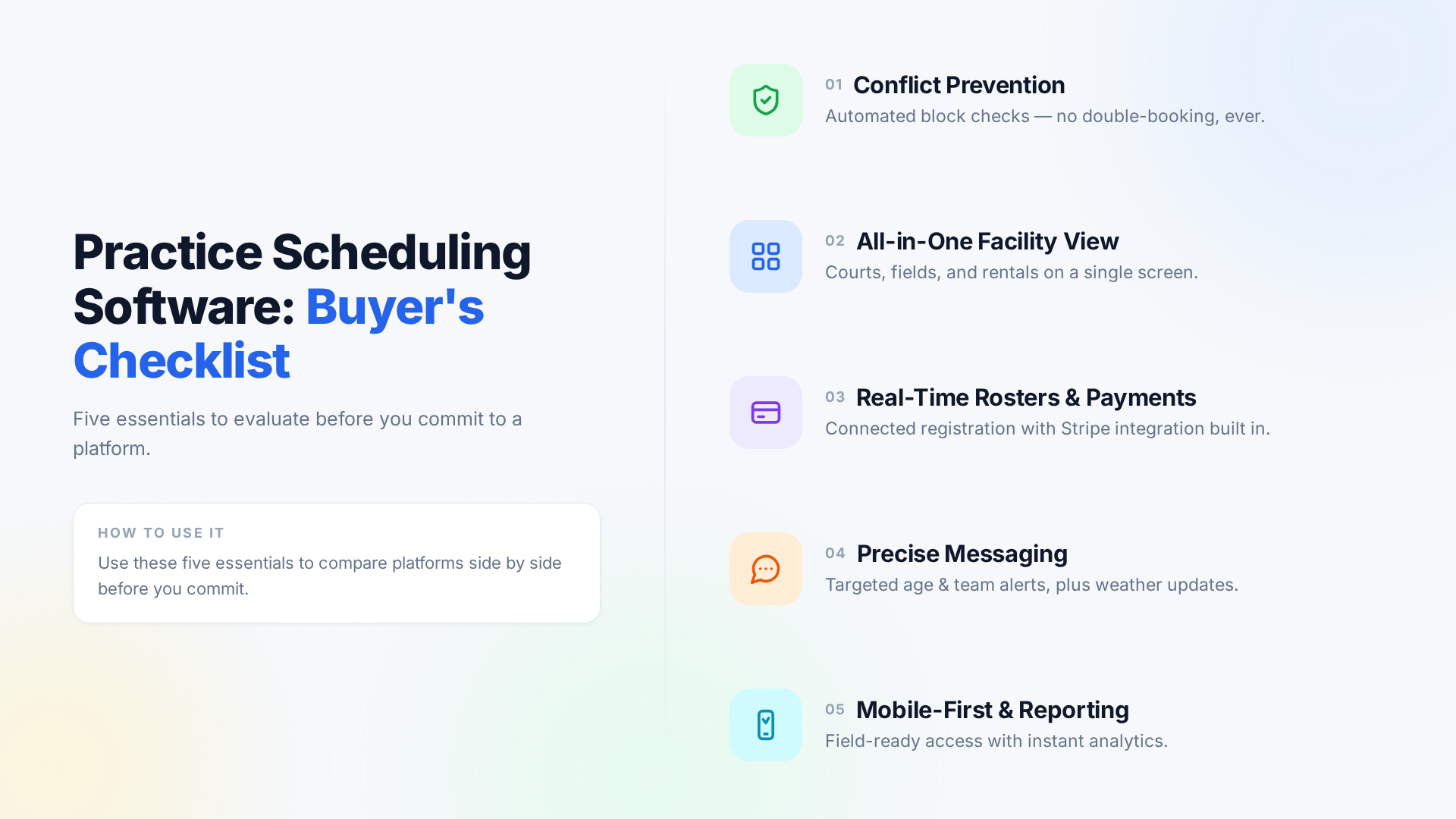
The first step is to avert conflicts. A calendar that lets you double-book and then shows a red signal only reports an issue you already have; it doesn't prevent it. Courts, fields, rents, and classrooms should all be on one screen rather than spread across four systems you must manually cross-reference. An all-in-one facility view matters, too. Next, make sure payments and registration are processed in real time, immediately linked to rosters, and that installments and reminders are automatically handled by a processor you know, such as Stripe.
Many platforms subtly fail in communication. Seek targeted messages with weather and cancellation notifications integrated rather than added, so you may target a specific team or age group rather than the whole league. Additionally, mobile access and reporting must be first-rate, not an afterthought, since most of this happens on a phone in a gym or on turf rather than at a desk. The platform isn't functioning properly if attendance, income, and usage metrics only appear after you create your own spreadsheet.
Score each of these five as yes, partial, or no in every demo. A vendor that hedges on any of them is telling you where the gaps are.
Standalone Tools vs. an Integrated Operating System
| Capability | GroupMe + Excel + Legacy Registration | Waresport (All-in-One OS) |
| Conflict prevention | Manual checking; errors surface on game day | Real-time conflict prevention across every court and field |
| Recurring schedule generation | Rebuilt manually, week by week | Generated once, checked against the full season |
| Registration and payments | Separate forms, manual payment tracking | Automated forms, tiered payments, Stripe fee collection |
| Roster accuracy | Depends on manual exports and imports | Tied directly to live registration and payment status |
| Availability tracking | Group chat guesswork | Confirm/decline ahead of each practice |
| Communication | Multiple chats, email, texts; no central record | Unified in-app chat, roster alerts, weather/cancellation alerts |
| Coach permissions | Everyone can edit everything | Request/approve workflow with defined roles |
| Reporting | Hand-built spreadsheets, usually stale | Dashboards for attendance, revenue, and eligibility |
| Admin time per week | High and unpredictable | Lower, with routine tasks automated |
The standalone stack isn't useless. For a six-team rec league with one field, it can genuinely work fine. The trouble starts as you grow: a second facility, added rentals, a compliance requirement you didn't have last year. Each new tool bolted onto the stack becomes another place where information can quietly drift out of sync with everything else.
An integrated system costs more attention up front and earns it back every single week after. If you're already spending several hours a week reconciling tools by hand, you're paying for the integration anyway, just in labor instead of a subscription.
Implementation and ROI: A 7-Day Migration Playbook
You don't have to wait for the off-season. With a plan, you can migrate mid-season without disrupting the practices already on the books. Here's a realistic one-week roadmap.
Day 1: Audit and rules. List every facility, team, coach, and current practice slot. Write down your scheduling rules: priority, rotation, blackouts. Identify every tool currently in use so you don't leave anything behind in the switch.
Day 2: Set up facilities and teams. Enter courts, fields, and rooms. Create teams and age groups. Load existing rosters as they stand today.
Day 3: Load the current schedule as-is. Enter existing practice slots and rentals exactly as they run right now. Don't redesign anything yet. The goal is a like-for-like copy, so the switch is invisible to families for the first week.
Day 4: Configure registration and payments. Build your forms, set up tiered payment plans, connect Stripe. Test it with one internal registration before anyone else sees it.
Day 5: Train coaches, briefly. Give coaches a 15-minute walkthrough covering three things: viewing their schedule, requesting a change, and messaging their team. Keep it short and specific. A long training session guarantees half of it gets forgotten.
Day 6: Announce and soft launch. Tell families exactly where schedule updates will live from now on. If you're nervous, run the old and new systems in parallel for one day before fully cutting over.
Day 7: Switch over. Retire the old group chats for schedule announcements. Lock the spreadsheet as read-only, archived, done. Review any conflicts that surfaced and confirm every team has the correct slot before the week's first practice.
After that, start optimizing: fill empty slots, adjust rotation, and actually read the dashboards instead of just having them.
Measuring the Payoff
Every organization is different, so treat these as things to track, not guaranteed outcomes. Take a baseline before you switch, then compare at 30 and 90 days.
- Admin hours per week. Count time spent on scheduling changes, reminders, and reconciling rosters by hand. A director juggling 40 teams who spends eight hours a week on this has a clear target to reduce.
- Payment delinquency rate. Track the percentage of balances past due. Automated reminders and visible payment status usually move this in the right direction within a month or two.
- Double-booking incidents. The target is zero. Count them before and after switching, and compare honestly.
- Facility utilization. Divide booked hours by available hours for each space. Even a small improvement on prime-time slots can translate directly into rental revenue.
- Parent and coach complaints. Count them. It's a rough measure, but it's a decent proxy for whether communication is actually working.
Put a dollar figure on each one where you can. Hours saved, multiplied by your effective hourly cost, plus recovered balances and added rental revenue, tends to add up faster than most directors expect going in..
Make the Calendar Work for You
Sports league practice scheduling breaks down when registration, facilities, communication, and reporting all live in separate places. Fix the process first: clear rules, one facility calendar, rosters tied to payments, a single channel for changes, and sane permission levels for coaches. Then pick software that supports that process instead of forcing you to work around it.
If you're tired of late-night texts and court 3 surprises, see how it runs in practice. Book a 20-minute Waresport Demo, and we'll walk through your current schedule, show you exactly where conflicts are hiding, and map out a mid-season migration plan. No pressure, and no need to overhaul anything you don't want to touch.
Sports league practice scheduling is the process of organizing team practice times, facilities, recurring schedules, availability, and schedule changes while preventing conflicts between teams sharing the same courts or fields.
Sports league scheduling software helps leagues manage team schedules, facilities, recurring practices, availability, conflicts, rosters, and communication from a centralized system.
Sports league scheduling software can check new practice bookings against the existing facility calendar and prevent conflicting teams from being assigned to the same court or field.
Start by defining scheduling rules for priorities, rotations, blackout dates, and change requests. Then centralize facility availability, automate recurring practices, connect schedules to current rosters, and establish one channel for schedule update
Yes. Practice scheduling software can create recurring practice blocks and check them against existing bookings and blackout dates, reducing the need to manually schedule every practice.
Yes. Availability tracking allows parents or players to confirm whether they plan to attend a practice, helping coaches plan sessions and helping leagues identify potentially underused facility slots.
An integrated system can connect registration and payment information with team rosters, helping administrators schedule practices using current enrollment and payment status.
Leagues should use a centralized communication channel for practice changes, cancellations, weather alerts, and other schedule updates so coaches, parents, and administrators receive consistent information.
Leagues can monitor booked and available facility hours, identify empty slots, track recurring usage patterns, and adjust schedules to make better use of courts, fields, and other facilities.
The blog presents a 7-day migration approach covering facility setup, team and roster configuration, existing schedules, registration and payments, coach training, communication, and the final switch-over.
This is what we built Waresport for